El Super
- 4.2
- Rating
- 10.00K
- Installs
- Free
- Price

 Analysis by App-foxy
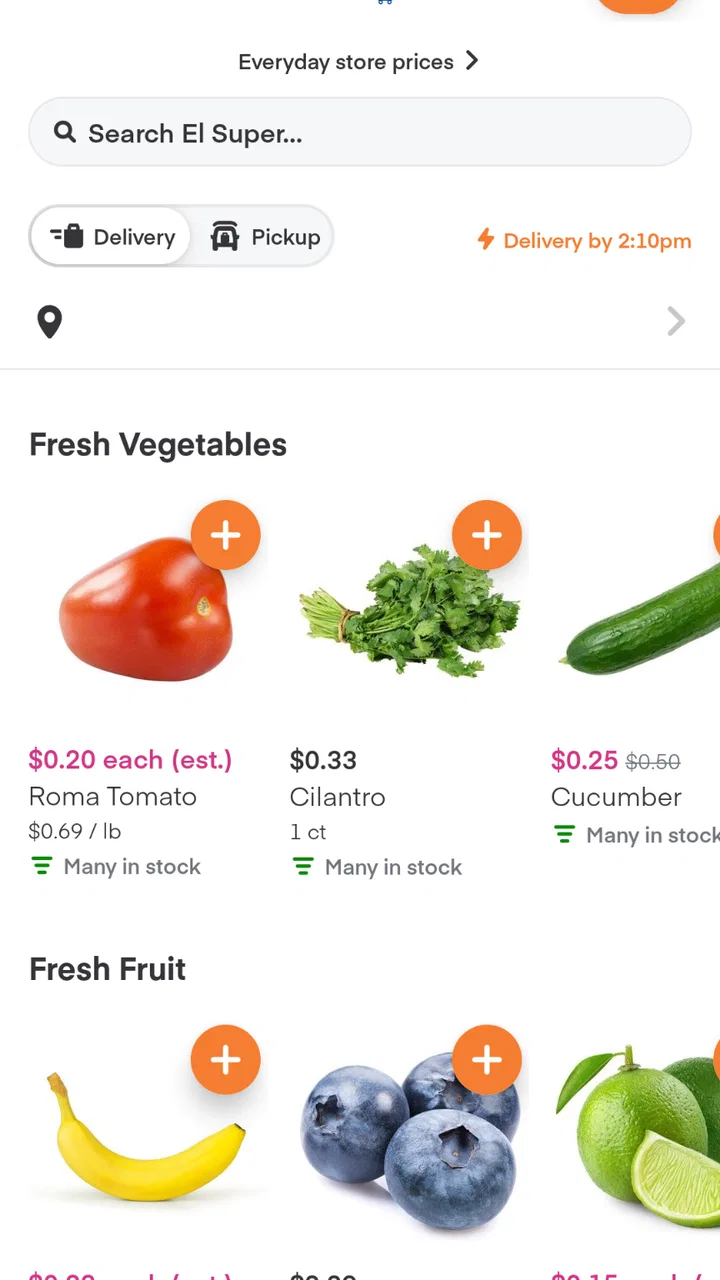
I approached El Super as a practical grocery-shopping app rather than as a simple digital version of a supermarket flyer. It is a free Food & Drink app from Instacart, built around the El Super shopping experience, and its main appeal is convenience: you can browse groceries from your phone instead of making a separate trip just to check what is available. That sounds straightforward, but the real question is whether the app gives you enough control and clarity to feel comfortable using it.
My overall impression is positive, with an important qualification. This is most useful when you already shop at El Super and want a faster way to organize a purchase, especially when time matters or you are trying to avoid an unnecessary store visit. It is less compelling if you prefer choosing every item yourself, comparing several supermarkets manually, or keeping your shopping entirely offline. The app can reduce friction, but it does not remove the need to review your order carefully.
What using the El Super app feels like in everyday shopping
The app’s identity is clear from the first interaction: it connects the El Super grocery experience with the technology provided by Instacart. That relationship matters because you are not looking at a general recipe app or a broad food marketplace with no particular store focus. You are using a shopping tool associated with a specific supermarket brand, which makes it more relevant to regular El Super customers than to someone simply searching for the cheapest groceries in an entire city.
You May Also Like

 AccuWeather: Weather Radar
AccuWeather Review: A Quick, Clear Forecast for Everyday Decisions
For everyday plans, the best forecast is the one you can understand quickly. AccuWeather makes rain timing, radar, and local conditions easy to act on, with a few trade-offs.

 Hill Climb Racing
Why Hill Climb Racing Still Turns Crashes Into One More Run
A tiny car, a bumpy hill and one more upgrade: Hill Climb Racing keeps resurfacing because its simple chaos makes every near-miss feel personal.

 AliExpress - Shopping App
AliExpress Makes Global Shopping Feel Personal, but Shoppers Bear the Risk
AliExpress turns a global marketplace into a pocket-sized discovery engine. Its reach is useful, its shopping loop compelling, and its trade-offs easy to miss.

 Lords Mobile: Kingdom Wars
Lords Mobile Is a Kingdom-Building Routine, Not a Quick Match
A case-by-case verdict on the building, battles, device demands, and social commitments that make Lords Mobile rewarding for some players and exhausting for others.

 PDF Scanner app - TapScanner
TapScanner Makes Paperwork Easier to Capture, Check, and Share
TapScanner makes scanning with a phone feel less like a rescue operation and more like a dependable step in getting work done. Its capture tools are useful, though not flawless.

 Block Blast!
 Shows How Much a Puzzle Game Can Leave Out
A quiet grid game shows why puzzle players increasingly value instant clarity, repeatable skill and low-pressure play—and where the genre still needs to catch up.
More From Our News Desk
View All News


I can see the app fitting naturally into a busy weekday. Imagine realizing after work that you need tortillas, produce, milk, and a few pantry items, while also trying to get dinner started. Browsing from the phone lets you make decisions before committing to the trip or completing the purchase. The useful part is not just saving a few minutes of walking around aisles; it is being able to think through the list while you are already at home, where you can check the refrigerator and cupboards.
That workflow also exposes the first practical limitation. Grocery shopping is full of details that are easy to overlook on a small screen. Package sizes, varieties, substitutions, and availability can change the value of an order. I would not treat the first item that appears as an automatic choice. I would open the product details, check the size, and review the complete basket before moving forward. The app is most trustworthy when you use it as a decision tool, not as a reason to stop checking your own order.
The published store information places the app at a 4.2 average from around 134 ratings, with over 10 thousand installs. Those figures suggest that it has found a real audience, but they do not tell me whether every shopper will have the same experience. Grocery apps depend heavily on the local store, the products you want, and how much control the ordering process gives you at each step. I would read the rating as a useful signal of general acceptance, not as a promise of flawless fulfillment.
Why the developer relationship matters
Instacart is listed as the developer, while the app is presented for El Super. For a user, that distinction is worth noticing because it tells you who is responsible for the software layer and why the experience may feel different from shopping directly through a supermarket’s own website or a traditional paper list. If something feels unfamiliar, it may be because the app follows Instacart’s approach to digital grocery ordering rather than El Super’s in-store habits.
That arrangement can be convenient, but it also means I would pay attention to the screens where the app asks me to sign in, confirm an order, or make choices about delivery and pickup. A recognizable store name can create a sense of familiarity, yet the important decisions still happen inside the app. I prefer to slow down at those points instead of assuming that the branding answers every question about the transaction.
The app is free to install, which lowers the barrier to trying it. Free access is helpful for someone who wants to inspect the catalog or decide whether the digital workflow suits their routine before relying on it. It should not be confused with a guarantee that every shopping method inside the app will cost the same as walking into the store. The sensible approach is to review the final order details and any choices presented before confirming anything.
Controls and choices I would check first
Trust in a grocery app is built through visible choices. Before using it for a large shop, I would look for clear controls around account access, order review, and the way the app handles information needed to complete the shopping process. I would also make sure I understand whether I am browsing, preparing a cart, or actually submitting an order. Those stages can feel similar when an interface is designed to move quickly.
One useful habit is to create a small test basket before depending on the app for a full weekly shop. Choose a few familiar products, inspect the details, and follow the process far enough to understand what the app asks from you. This is a better test than installing it and immediately building a large order because it gives you room to notice confusing labels or unexpected steps without having a crowded basket to untangle.
I would also review account settings when I first sign in rather than leaving them for later. If the app offers controls for notifications, saved information, or communication preferences, I would choose only what I need. Turning off unnecessary alerts can make the experience calmer and reduces the chance that important order messages are buried among promotional reminders. The key point is to use the choices that are visibly available instead of assuming the app will automatically match your preferred level of contact.
Another practical control is the ability to pause and review. I do not like rushing from product discovery to confirmation, particularly with groceries where a small mistake can affect several meals. I would check quantities one by one, especially when adding repeated items from a search result. I would also revisit the basket after browsing for a while, because it is easy to add a second version of something without noticing.
For families, shared shopping can create a different kind of risk. If more than one person uses the same account or device, I would agree on who has permission to make the final confirmation. A child tapping through a phone, a partner adding an alternative brand, or a household member changing a quantity can all produce an order that technically reflects the account but not the person who intended to shop. Keeping that responsibility clear is a simple form of account control.
Data-sensitive moments deserve extra attention
Grocery shopping may feel low-risk compared with banking, but an app can still be involved in personal routines. Shopping patterns can reveal dietary preferences, household size, health-related choices, or religious and cultural needs. I would therefore treat the account and ordering screens with the same basic care I use for any service that records repeated behavior.
I would avoid signing in on a shared or public device, and I would not leave the account open on a phone that other people regularly use. If the app provides a sign-out option, using it is worthwhile when the device is not private. I would also keep the phone’s own lock screen active. These are ordinary precautions, but they matter more than trying to guess what an app might do behind the scenes.
When the app requests access to a device function, I would consider whether that access is necessary for the action I am taking. I would grant only what is clearly useful for the shopping task and revisit permissions later if I no longer need them. I would not interpret a permission prompt as proof that the app is unsafe, but I also would not approve every request automatically. The best balance is deliberate choice.
I would be especially careful when entering contact or payment information. The right time to do that is when I have decided to proceed, not merely because I want to browse. Before confirming, I would check the account details, the order contents, and the final screen for any option that changes how the purchase will be handled. If a screen is unclear, I would stop and read it rather than relying on a quick tap.
Privacy choices are also easier to manage when you separate essential communication from optional messages. Order-related notifications may be useful, while general promotional contact may not be. If the app presents separate settings, I would keep the ones that help me track an active order and disable the ones that add noise. This approach preserves practical information without making the app more intrusive than necessary.
Where the app saves time and where it cannot replace judgment
The strongest use case is planned shopping. I would open the app with a list already in mind, search for the items, and use the basket as a checklist. This prevents the common problem of wandering through a store and remembering forgotten essentials only after returning home. It also makes it easier to compare what I need with what I already have before I commit.
A second useful scenario is shopping for someone else. If a family member is recovering at home or cannot make the trip, a digital basket can make it easier to organize familiar groceries without asking them to describe every aisle. I would still confirm brand preferences and sizes directly, because a visually similar product may not be an acceptable substitute. The app helps with coordination, but it does not replace a short conversation about what matters.
For recurring purchases, I would use the previous order as a memory aid if the app presents that option, but I would not blindly repeat it. Household needs change, and grocery catalogs change with them. A past basket can remind me about staples while also encouraging a quick review of quantities, flavors, and package sizes. That is a more reliable routine than treating last week’s choices as a permanent template.
The app is also useful for people who find physical stores tiring or distracting. Browsing at home can make the process more manageable, especially when a long aisle-by-aisle trip is difficult. However, shoppers who need to inspect produce personally or who often make decisions only after seeing products in person may prefer the traditional store visit. For them, the app may work better as a planning aid than as a complete replacement.
Compared with a handwritten list, the app offers a more direct path from remembering an item to placing it in a digital basket. Compared with a supermarket website, its value comes from the El Super focus and the Instacart-powered shopping structure. Compared with visiting the store, it trades physical inspection for convenience. None of those options is universally better; the right choice depends on whether your priority is control, speed, discovery, or personal selection.
Small habits that make the experience more dependable
I would begin with a short list and search using simple, specific terms. If a result looks close but not exact, I would inspect it rather than assuming the name tells the whole story. This is particularly important for products sold in multiple sizes or varieties. A few extra seconds at the item level can prevent a frustrating correction later.
I would divide a large shop into groups such as breakfast, dinner, household basics, and fresh food. That structure makes it easier to notice gaps and to remove impulse additions before checkout. It also helps when another household member reviews the basket, because they can understand the purpose of each item without starting over.
For fresh items, I would plan with flexibility. Produce and refrigerated goods can require more judgment than packaged food, so I would not build a meal plan that depends on one exact product unless I am prepared to adjust it. A practical strategy is to choose a backup ingredient while shopping. That way, the app supports the plan without making the whole dinner depend on one listing.
I would take a screenshot or note of the final order summary only if the app makes that appropriate and the information is not sensitive. More importantly, I would read the confirmation screen and keep any order reference the app visibly provides. This is less about distrust and more about making follow-up easier if I need to check what I selected.
Finally, I would keep the app updated. The current version is 9.30.0, and it requires Android 8.0 or later. That makes compatibility straightforward for many Android users, but anyone with an older phone should check the operating system before planning around it. Updating also gives the app the best chance of working as intended, although an update alone cannot solve local product availability or personal preference issues.
Who should use it and who may want another method
I would recommend trying it if you already shop at El Super, want to organize groceries from home, or need a more manageable way to prepare a purchase for another person. It is also a reasonable option for someone who prefers a digital checklist and wants to reduce the time spent navigating a physical store.
I would be more cautious about recommending it to shoppers who compare several supermarkets on every purchase. A store-focused app may not give you the broad comparison view you want. Someone who bases decisions on examining produce, checking labels in person, or finding unplanned bargains may also be happier visiting the store or using the app only to prepare a list.
People who are uncomfortable creating accounts or entering personal details into shopping services should take time to inspect the visible settings before committing. The app is free, but convenience still involves choices about how you access the service and how you manage communications. If those choices feel unclear, a paper list and in-person visit may be the better fit for now.
The age rating is Everyone, which makes the app broadly suitable from a content perspective. That does not mean every shopping decision should be left to a child. Account access, order confirmation, and payment-related actions should remain with the person responsible for the household purchase.
My cautious verdict after looking beyond convenience
El Super is a focused grocery app with a sensible purpose: it brings El Super shopping into a mobile workflow powered by Instacart. I like it most as a planning and organization tool. It can help me turn a household need into a structured basket, reduce avoidable trips, and make shopping easier when time or mobility is limited.
My reservation is not that the concept is weak; it is that grocery convenience can encourage rushed decisions. Product details, quantities, substitutions, account settings, and confirmation screens all deserve attention. I would use the app confidently for a modest, planned purchase after checking those steps, but I would not hand over complete responsibility to any digital grocery tool.
With a 4.2 average and more than 10 thousand installs, it has enough visible adoption to justify a trial, while its free price makes that trial low-risk. I would start small, adjust the notification and account choices to my comfort level, and compare the experience with my normal El Super visit. My recommendation is to use it when convenience is the priority, while keeping final control over every item and every account decision.
That balanced approach is where the app makes the most sense. It is not a replacement for personal judgment, and it may not suit shoppers who want broad store comparison or hands-on product selection. But for an El Super customer who wants a clearer, more flexible way to prepare groceries, it is a worthwhile option to test.
FAQs for El Super
01What is El Super and what can I use it for?
El Super is a shopping app designed to help users browse products, check prices, discover promotions, and manage grocery purchases from participating El Super stores. Depending on your location, the app may also provide store information, digital deals, shopping lists, and online ordering or pickup options. Available features can vary by region and store availability.
02Can I place grocery orders through the El Super app?
In supported areas, El Super may allow you to select groceries and other products for online purchase, pickup, or delivery. However, these services are not necessarily available at every store or location. Before relying on the app for a full shopping trip, check whether your preferred store supports ordering and review delivery fees, pickup times, product substitutions, and minimum order requirements.
03Does El Super offer digital coupons or special promotions?
The app may include weekly specials, digital coupons, loyalty-related offers, and promotional prices for selected products. Some deals require you to sign in, activate the offer, or identify yourself at checkout using an account, phone number, or digital barcode. Promotions can have expiration dates, purchase limits, and location restrictions, so always read the terms before shopping.
04Do I need an account to use El Super?
You may be able to browse store information, products, or public promotions without creating an account, but registration is generally useful for saving shopping lists, accessing personalized deals, managing orders, and viewing purchase details. Account requirements can differ depending on the feature you want to use. Review the requested permissions and privacy information before submitting your personal details.
05Is El Super available on both Android and iPhone?
El Super is intended for mobile shoppers and may be available through the official Google Play Store for Android devices and the Apple App Store for iPhone users. Availability can depend on your country, device compatibility, and the current version published by the developer. Download it only from an official store, and confirm the developer name to avoid unofficial or misleading copies.
Pros
- Easy access to weekly deals and digital coupons.
- Convenient browsing of groceries and household products.
- Store information helps plan visits more efficiently.
- Clean layout makes product categories easy to navigate.
- Useful for comparing promotions before shopping in-store.
Cons
- Deals and availability may vary by store location.
- Some offers require account registration or app permissions.
- Product prices may not always reflect local taxes or fees.
- The app may feel slow when loading promotions on weak connections.
- Not every store feature or service is available in the app.

El Super
Gallery